Set Firefox to Allow 10 Simultaneous Downloads Print
Written by mypchell.com   
Thursday, 14 February 2008
Image Just like Internet Explorer, Firefox has a default to only allow you to download only 2 items at the same time. Changing this, is not as simple as going into your Preferences and changing a setting…

Note: Click on any image for a larger view of that particular image.

To change this to allow 10 (or more) simultaneous downloads. Do the following:

Open a new Firefox browser window.
Then in the address bar type about:config then hit enter

Next scroll down and locate the setting for:
network.http.max-persistent-connections-per-server

Double Click on it and change the value to a 10 (or whatever you want)
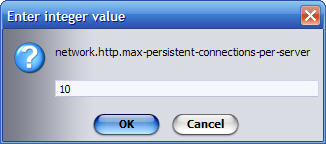
Then simply close firefox and reopen

Comments (0)add comment

Write comment
quote
bold
italicize
underline
strike
url
image
quote
quote
smile
wink
laugh
grin
angry
sad
shocked
cool
tongue
kiss
cry
smaller | bigger

security image
Write the displayed characters


busy
 
< Prev   Next >
Minneapolis London Tokyo Honolulu

Translate


Recommended Sites

Shell Extension City

Latest Comments

windows 7
watch out for windows 7.. let's see if the open source community can keep up.. :...

this list is the s&^t, thank you,not till now have i discovered such a list.
fool
the product key found in unattend.txt is ot the product key for the install CD b...
what about switches
Thanks for the post! its a goody the run command will take in switches for a lot...
FANTASTIC YAR I CANT THIN...
ITS VERY USEFUL FOR MEEEEEEEEEEEEEEE IDONT THINK ITS VERY ESASILY FOUNDED IN NET

Who's Online

We have 8 guests online