|
Remove Programs from Add/Remove Programs |
|
|
Written by mypchell.com
|
|
Tuesday, 19 February 2008 |
 |
In Windows XP, Uninstalling a program is supposed to be easy using the Add/Remove Programs utility; that is, when it works. If you have a program that you have uninstalled, but it is still showing up in the Add/Remove Programs List, you should do the following… |
Disclaimer: Warning Serious problems might occur if you modify the registry incorrectly by using Registry Editor or by using another method. Modify the registry at your own risk, Every effort has been made to ensure that registry edit instructions are correct and safe. MyPCHell cannot be held responsible for any damage done to your system by using this guide.
Note: Click on any image for a larger view of that particular image.
Before beginning this guide, please do this
Click 
then 
Type regedit then click 
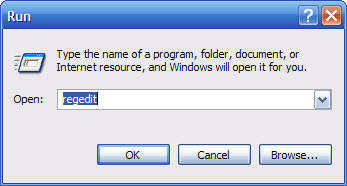
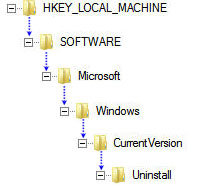
Then Navigate to the following key:
HKEY_LOCAL_MACHINE\SOFTWARE\Microsoft\Windows\CurrentVersion\Uninstall
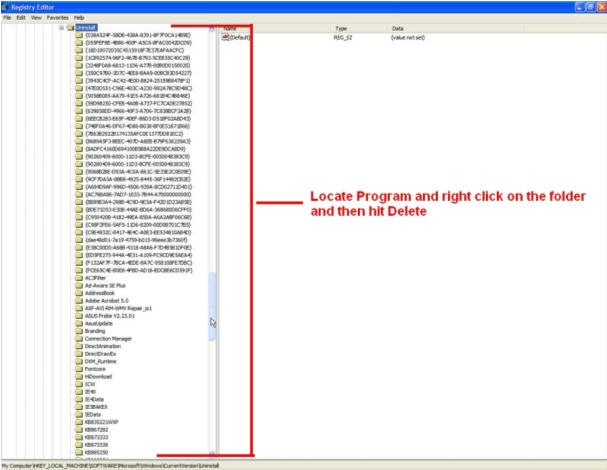
Locate and Delete the folder of the program that is uninstalled but still appearing in the Add/Remove Programs.
Reboot your computer
|
|
|
| Minneapolis |
London |
Tokyo |
Honolulu |
|
|
|
|
Latest Comments
windows 7 watch out for windows 7.. let's see if the open source community can keep up.. :... | this list is the s&^t, thank you,not till now have i discovered such a list. | fool the product key found in unattend.txt is ot the product key for the install CD b... | what about switches Thanks for the post! its a goody
the run command will take in switches for a lot... | FANTASTIC YAR I CANT THIN... ITS VERY USEFUL FOR MEEEEEEEEEEEEEEE IDONT THINK ITS VERY ESASILY FOUNDED IN NET |
Who's Online
We have 8 guests online
|