|
Smaller Volume Control Panel |
|
|
Written by mypchell.com
|
|
Friday, 14 March 2008 |
 |
To reduce the size of the volume control panel, do the following:
|
Note: Click on any image for a larger view of that particular image.
Click 
then 
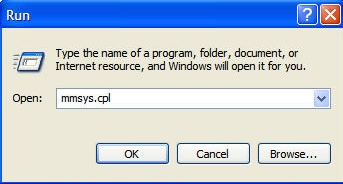
Type mmsys.cpl, then click 
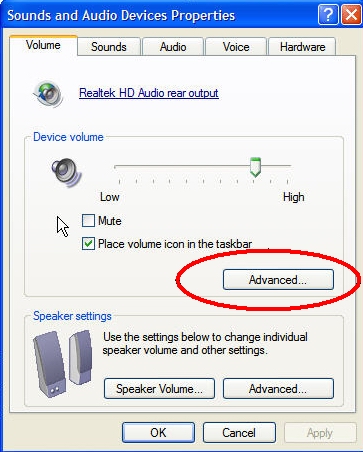
Copy Under Device Volume, Click Advanced
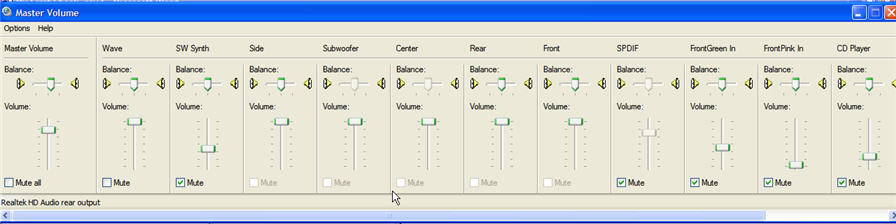
When the Master Volume Control Panel opens, hit CONTROL + S
B E F O R E
A F T E R
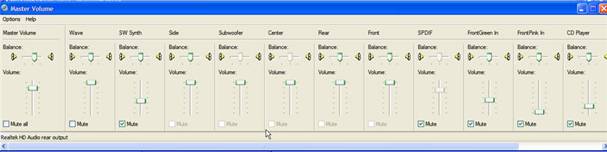
Your Volume Control Panel will now be much Smaller (note:to get back to the larger view again, simply hit Control + S again).
|
|
|
| Minneapolis |
London |
Tokyo |
Honolulu |
|
|
|
|
Latest Comments
Internet (Explorer) Maybe you should say that this relates to Internet Explorer. Speed of a browser ... | You whine when some features are missing, and again you whine when you get extra... | This works... Finally stopped and spent a second finding out how to not go into the display pr... | Not really... "Game Controllers" it's very useful. You are wrong on this one. | another bad feature I think that one of the worst WinXP features is the fact that when you open the ... |
Who's Online
We have 2 guests online
|