Recreate the Show Desktop shortcut Print
Written by mypchell.com   
Monday, 16 June 2008
Image The Show Desktop shortcut by default is installed to the quick launch bar. It is a handy shortcut to use especially when you have tons of windows open and you need to get to your desktop. What if you deleted it? Recreating the shortcut using the Shortcut wizard seems like the way to go, but alas it does not work. Here is a simple method to recreate the Show Desktop shortcut.


Note: Click on any image for a larger view of that particular image.


Click backupreg_01.jpg


then backupreg_02.jpg


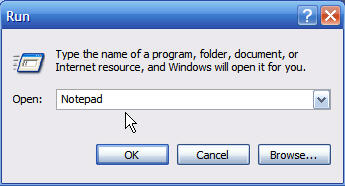
Type notepad then click backupreg_03.jpg


Open

Copy/Paste the following into Notepad:

[Shell]
Command=2
IconFile=explorer.exe,3
[Taskbar]
Command=ToggleDesktop
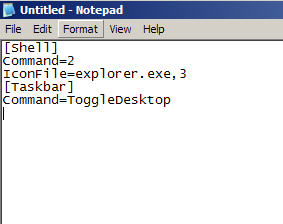
Copy-Paste

Then Go to File, then Save As, then navigate to any location (just remember where you went) I chose Desktop. Make sure that Save As Type is set to All Files. Then Name the file “Show Desktop.scf" then click Save.
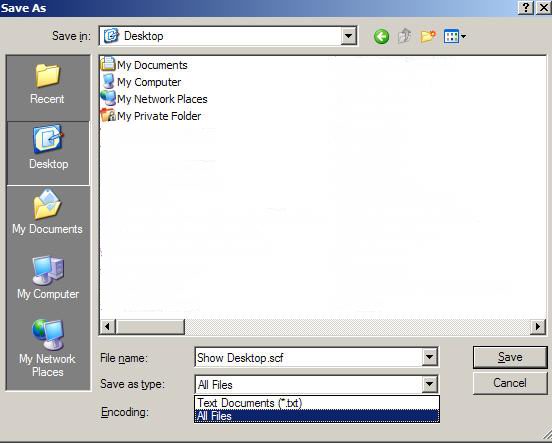
Name

Now, navigate to your desktop to see your newly recreated Show Desktop shortcut

Here
Comments (3)add comment

Ben Jeffers said:

i was given this info by another website but it did not tell me to save it as all files. thanks it worked smilies/cheesy.gif
 
report abuse
vote down
vote up
October 08, 2008
Votes: +0

Alexander said:

it works perfectly, just drag and drop the shortcut to the quicklaunch area.. perhaps change the size of the are to make it fit. Right click the quicklaunch bar and unlock the taskbar.. then resize area.. and then lock the taskbar again.
 
report abuse
vote down
vote up
October 26, 2008 | url
Votes: +0

Kwithie said:

It worked -- I got a favorite shortcut back! Now if I could just figure out why it vanished in the first place...
 
report abuse
vote down
vote up
November 14, 2008
Votes: +1

Write comment
quote
bold
italicize
underline
strike
url
image
quote
quote
smile
wink
laugh
grin
angry
sad
shocked
cool
tongue
kiss
cry
smaller | bigger

security image
Write the displayed characters


busy
 
< Prev   Next >
Minneapolis London Tokyo Honolulu

Translate


Recommended Sites

Shell Extension City

Latest Comments


WHY DO YOU ALL CONTINUE TO PRINT THAT THIS KEY IN UNATTEND.TXT WILL WORK???? IT ...
hello
thanks thanks thanks very very thanks

for Sketch: write 'msconfig' in RUN. Under the tab startup, U unmark all the ite...

This is fantastic, but I didn't find the command I want. Anyone know the run c...
Comment
This is really good. I love your site.

Who's Online

We have 11 guests online