|
Require Control+Alt+Delete For More Security |
|
|
Written by mypchell.com
|
|
Monday, 16 June 2008 |
 |
For additional security, enable the Control+Alt+Delete login screen for XP. Using this is far more secure than the traditional XP login screen due to the fact that no program can intercept CTRL+ALT+DEL. Thus you are protecting yourself from a application (a bad application, could be spyware or a virus) from learning your machine password. |
Note: Click on any image for a larger view of that particular image.
Click 
then 
Type control userpasswords2 then click 
Click on the Advanced Tab
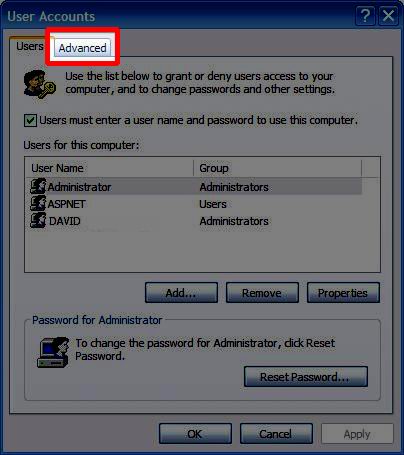
then put a Check Mark in the Secure Login section.
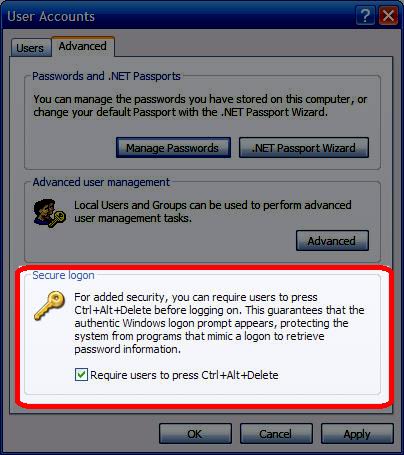
Then Click Apply and then Reboot and the Control + Alt + Delete screen should pop up
|
|
|
| Minneapolis |
London |
Tokyo |
Honolulu |
|
|
|
|
Latest Comments
run command very good  | Thank you! Thank you! Having commenced the set up of a new PC, I found myself on the Windows Vista acc... | na Yours is a great site I just found, but my Dell Laptop's entire Media buttons do... | very nice stuff very good work ppl. | Fantastic!!!! very nice!!! It helps lot for me |
Who's Online
We have 13 guests online
|