Reset the Administrator Password Print
Written by mypchell.com   
Monday, 16 June 2008
Image The main Administrator account is a hidden user account that is installed with Windows XP. If you have ever booted into safe mode you have seen this user Account (the username is simply “Administrator"). Well if you have forgotten the password (and your username is classified as an administrator) you can reset the password.


Note: Click on any image for a larger view of that particular image.


Click backupreg_01.jpg


then backupreg_02.jpg


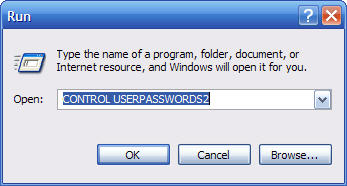
Type control userpasswords2 then click backupreg_03.jpg


Reset_Admin_Password

Then under the Password for Administrator section click on Reset Password
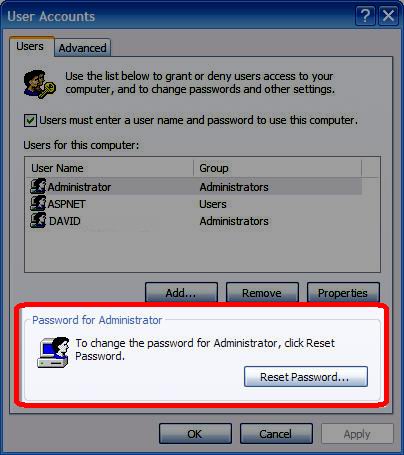
Click_on_Reset_Password

then type and confirm a new password (note: the user that you are using to do this change must be an administrator)
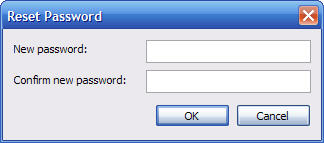
Type_New_Password

Then Click Ok then Apply

Comments (2)add comment

Adams said:

very good work ppl.
 
report abuse
vote down
vote up
August 08, 2008
Votes: +0

Pritesh jain said:

Plz provide other useful link, i am very much thank full for you.

Regards

Pritesh Jain
 
report abuse
vote down
vote up
September 06, 2008
Votes: +0

Write comment
quote
bold
italicize
underline
strike
url
image
quote
quote
smile
wink
laugh
grin
angry
sad
shocked
cool
tongue
kiss
cry
smaller | bigger

security image
Write the displayed characters


busy
 
< Prev   Next >
Minneapolis London Tokyo Honolulu

Translate


Recommended Sites

Shell Extension City

Latest Comments


WHY DO YOU ALL CONTINUE TO PRINT THAT THIS KEY IN UNATTEND.TXT WILL WORK???? IT ...
hello
thanks thanks thanks very very thanks

for Sketch: write 'msconfig' in RUN. Under the tab startup, U unmark all the ite...

This is fantastic, but I didn't find the command I want. Anyone know the run c...
Comment
This is really good. I love your site.

Who's Online

We have 15 guests online