Run Programs Secretly by Setting them To Open Minimized Print
Written by mypchell.com   
Monday, 16 June 2008
Image If you are like most computer users, you multi-task. Typically multi-taskers will have several programs open and will switch amongst them as they need to. If you want a particular program to always open silently (for example Ad Watch, which is a spyware monitor), you canset it to automatically open minimized (note: also the opposite you can set a program to always start in a maximized window) . Here is how…


Note: Click on any image for a larger view of that particular image.


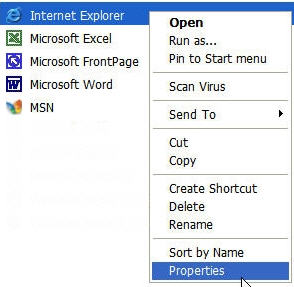
First locate the program's executable (ie. what you would click on if you wanted to launch the program), then you right click on it and select properties. For this example I have chosen Internet Explorer:
priorityprograms01.jpg

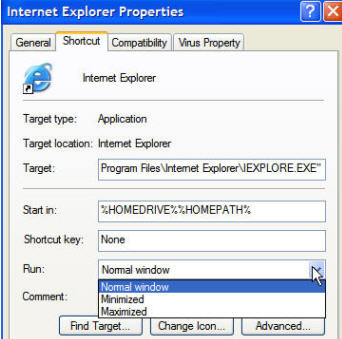
Then click on the menu for Run and select Maximum to have the program run with more priority, or Minimum if you want the program to be run with less priority.
priorityprograms02.jpg

Then Click Apply

Comments (0)add comment

Write comment
quote
bold
italicize
underline
strike
url
image
quote
quote
smile
wink
laugh
grin
angry
sad
shocked
cool
tongue
kiss
cry
smaller | bigger

security image
Write the displayed characters


busy
 
< Prev   Next >
Minneapolis London Tokyo Honolulu

Translate


Recommended Sites

Shell Extension City

Latest Comments

run command
very good
Thank you! Thank you!
Having commenced the set up of a new PC, I found myself on the Windows Vista acc...
na
Yours is a great site I just found, but my Dell Laptop's entire Media buttons do...
very nice stuff
very good work ppl.

Fantastic!!!! very nice!!! It helps lot for me

Who's Online

We have 12 guests online