Disclaimer: Warning Serious problems might occur if you modify the registry incorrectly by using Registry Editor or by using another method. Modify the registry at your own risk, Every effort has been made to ensure that registry edit instructions are correct and safe. MyPCHell cannot be held responsible for any damage done to your system by using this guide.
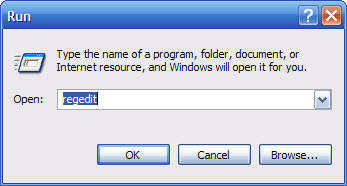
Click 
then 
Type regedit then click 
Navigate to the following key:
HKEY_CURRENT_USER\Software\Microsoft\InternetExplorer\Main
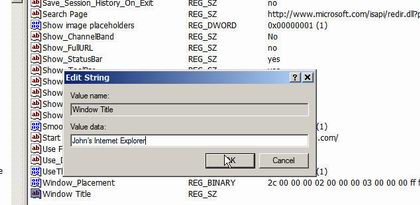
Find the string “Window Title” and double click it and enter whatever you want on the title bar of Internet Explorer, so for example John’s Crappy Internet Browser (note, if there is no Window Title String, create it by Right Clicking on the right hand window, then select New then String, then name the string Window Title)
Reboot your computer