Minimize Running Programs to Boost Your Available Memory Print
Written by mypchell.com   
Thursday, 26 June 2008
Image When programs are installed onto your computer, sometimes the program will auto configure itself to auto start whenever you boot your computer. What this does is use up some of your memory resources which does have a pronounced effect on your overall speed...(Continued)


Note: Click on any image for a larger view of that particular image.


This guide will show you how to inspect your system for startup programs and prevent them from automatically starting during the boot up process.


Disclaimer: Warning Serious problems might occur if you modify the registry incorrectly by using Registry Editor or by using another method. Modify the registry at your own risk, Every effort has been made to ensure that registry edit instructions are correct and safe. MyPCHell cannot be held responsible for any damage done to your system by using this guide.


Note: Click on any image for a larger view of that particular image.


Before beginning this guide, please do this


Click backupreg_01.jpg


then backupreg_02.jpg


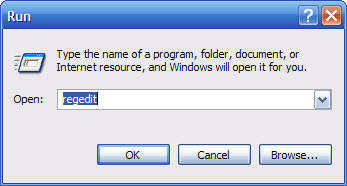
Type regedit then click backupreg_03.jpg


backupreg_04.jpg


Navigate to the following key:

HKEY_CURRENT_USER\Software\Microsoft\InternetExplorer\Main

Find the string “Window Title” and double click it and enter whatever you want on the title bar of Internet Explorer, so for example John’s Crappy Internet Browser (note, if there is no Window Title String, create it by Right Clicking on the right hand window, then select New then String, then name the string Window Title)
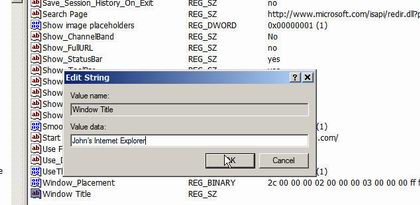
 

changeietitle_01.jpg


Reboot your computer


Comments (0)add comment

Write comment
quote
bold
italicize
underline
strike
url
image
quote
quote
smile
wink
laugh
grin
angry
sad
shocked
cool
tongue
kiss
cry
smaller | bigger

security image
Write the displayed characters


busy
 
< Prev   Next >
Minneapolis London Tokyo Honolulu

Translate


Recommended Sites

Shell Extension City

Latest Comments


WHY DO YOU ALL CONTINUE TO PRINT THAT THIS KEY IN UNATTEND.TXT WILL WORK???? IT ...
hello
thanks thanks thanks very very thanks

for Sketch: write 'msconfig' in RUN. Under the tab startup, U unmark all the ite...

This is fantastic, but I didn't find the command I want. Anyone know the run c...
Comment
This is really good. I love your site.

Who's Online

We have 18 guests online