7 Deadly Sins Of Email -Deadly Sin #7 Print
Written by mypchell.com   
Thursday, 26 June 2008
Image
Please Note: This update is part of a series, The Seven Deadly Sins of Email, written by Squeezebox. This update includes the 7th installment (of seven).

Not everyone has the full Microsoft Office, nor does everyone have Works. I suppose that most of my contacts have Word installed, but not all have Excel, PowerPoint, Publisher (the right version) and Access. How frustrating for someone to spend ages downloading that huge file you sent them, only to find out that they can’t even open it!


Note: Click on any image for a larger view of that particular image.


DEADLY SIN #7 – SENDING ATTACHMENTS THAT CAN’T BE OPENED


There are few file formats that are universal though, with everybody that has Internet access and Windows able to open and read.

Rich Text (rtf) - can be opened and read in any word processor software, including WordPad which is included with the Windows operating system.


So, when you’ve finished typing that document you are going to send as an attachment, save it in Rich Text format. You will be limited in the formatting that can be applied, but at least the recipient will be able to read it.

PDF - files can be opened with the free Adobe Reader, also usually installed along with the operating system. Adobe Reader can be downloaded easily if someone doesn’t have it installed.

You can also get free PDF creator programs easily. Convert your document to a PDF file before sending it. PDF’s can be created from desk top publishing programs such as Publisher or Serif Page Plus. Excel files can be converted to PDF too.

Free PDF Programs:

http://www.pdf995.com/

http://sourceforge.net/projects/pdfcreator/

http://www.cutepdf.com/

http://www.softpedia.com/get/Office-tools/PDF/PDFFree.shtml

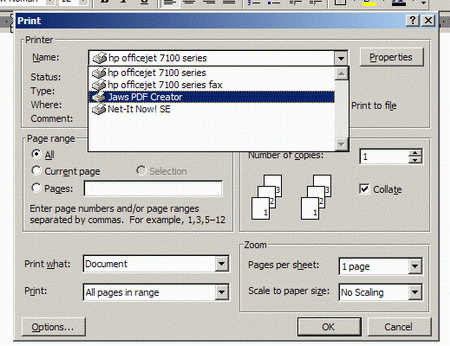
Once you’ve installed a PDF creator, you create the PDF file from the Print command.

File/Print and then change the printer selection to the PDF creator program:
 

7deadly_17.gif


HTML - everybody with an Internet browser can open an HTML file. So, you could create an HTML file from your original, many Office programs will convert to HTML directly from within the program.

If you know that your recipient has all the software necessary to read the file you are going to send, no need to convert it. Any doubt - send in a format that is pretty universal. PDF is one of the best for sending with fully preserved layout, images and fonts. Watch out for the file size though!


CLICK BELOW TO CONTINUE READING THE REST OF THE 7 DEADLY SINS OF EMAIL


pdt-2-20a_link.gif pdt-2-20b_link.gif pdt-2-20c_link.gif pdt-2-20d_link.gif pdt-2-20e_link.gif pdt-2-20f_link.gif pdt-2-20g_link.gif
Comments (0)add comment

Write comment
quote
bold
italicize
underline
strike
url
image
quote
quote
smile
wink
laugh
grin
angry
sad
shocked
cool
tongue
kiss
cry
smaller | bigger

security image
Write the displayed characters


busy
 
< Prev   Next >
Minneapolis London Tokyo Honolulu

Translate


Recommended Sites

Shell Extension City

Latest Comments

run command
very good
Thank you! Thank you!
Having commenced the set up of a new PC, I found myself on the Windows Vista acc...
na
Yours is a great site I just found, but my Dell Laptop's entire Media buttons do...
very nice stuff
very good work ppl.

Fantastic!!!! very nice!!! It helps lot for me

Who's Online

We have 15 guests online