| Fix a Messed Up Windows Media Player Library |
| Written by mypchell.com | ||||||||||||||||||||||||||||||||||||||||||||||||||||||||||||||||||||||||||||||||
|
Note: Click on any image for a larger view of that particular image. First, make sure WMP (WMP =Windows Media Player) is closed. Although WMP can handle multiple locations, it is recommended that you centralize where you are keeping your music (note that for this guide, I will focus only on Music. This procedure can be applied to video and photos as well). First we need to locate and delete the library index. To do this, Click
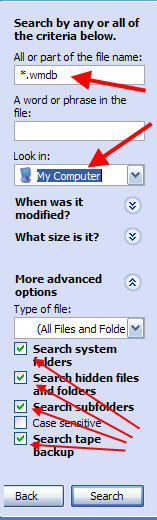
Choose All Files and Folders , then for the All or part of the file name, put *.wmdb , Change the Look in to My Computer. And make sure that Under the More Advanced Options That the all boxes are checked except Case Sensitive Then click SEARCH
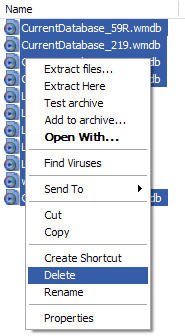
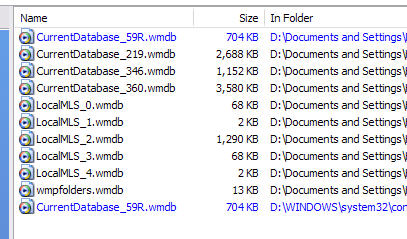
When the search is complete, Delete All of the files that it found (these should be all WMDB files)
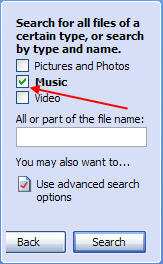
Next, is an optional step. I strongly suggest, that you keep your music all together in one folder (Note it is ok to have subfolders within the main music folder). If you do not know where all of your music is do a search. This time, we would choose Pictures, Music, or Video and check mark Music, then do not type anything in the All or part of the name Area, so that the search finds All Music.

This will produce a complete list of all MUSIC files on your pc. Move them into a centralized folder. As I said this is a optional, but recommended step. Finally, the last step, is to reopen Windows Media Player, it will automatically search your PC for Media files, and you will see this screen:
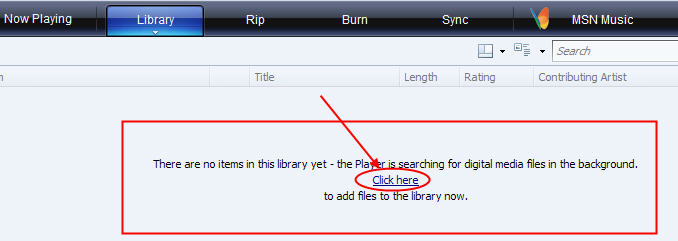
If it doesn’t start automatically searching, either, click on the Click Here button or, hit F3 . Windows Media Player will now cleanly rebuild your library. Similar articles
Set as favorite
Bookmark
Email This
Hits: 7899 Comments (21)
![]()
not null
said:
|
|
For some reason, every song in my library was present twice, duplicated in same album/cd so I would have to make a playlist or listen to each song twice in a row. Followed the directions and it worked like a charm without any data/song loss. Thanks, great tip. |
|
|
report abuse
vote down
vote up
|
|
I was very happy to see that fix. Is thier something similiar to that for HP photosmart premier? |
|
|
report abuse
vote down
vote up
|
| OY! It says it will take over 10 hours (and rising)... I think it will be worth it though. Thanks! | |
|
report abuse
vote down
vote up
|
|
Had to relocate my entire music folder so this will totally clean out my library and get rid of all the duplicates that would have been made had I not. Thanks a lot |
|
|
report abuse
vote down
vote up
|
| Thank you so much. Your advice has finally helped to solve this annoying problem | |
|
report abuse
vote down
vote up
|
| I cant add anything to library..I've tried all ways to do that..and checked microsoft tech support site but as usual it didnt help..any ideas?? | |
|
report abuse
vote down
vote up
|
| Stopped playing videos, numerous problems that are not true | |
|
report abuse
vote down
vote up
|
| How can you tell WMP to look in one specific folder? It tries to save to the Library any random media file I view. | |
|
report abuse
vote down
vote up
|
|
A retired programmer, I knew I needed to "rebuild index" so googled those terms and found your solution. Thanks! |
|
|
report abuse
vote down
vote up
|
| I like WMP and when my library stopped working I was going crazy. For three months i tried to get it fixed but no luck. So i had to download iTunes wich is not bad at all, but any way i like wmp more.. and after following your instructions now it works like the first day.. Thank you | |
|
report abuse
vote down
vote up
|
I cant add or remove anything from library, followed this tutorial removed my list but now when i try to add my music folder it just dosent search or do anything???? ideas please cos i think i may start to cry soon |
|
|
report abuse
vote down
vote up
|
|
I get this error when trying to delete search results: "Cannot delete file: Cannot read from the source file or disk." Any suggestions or solutions? |
|
|
report abuse
vote down
vote up
|
Been looking high and low for the fix for my music folder/library. This seems to have cleaned things up. Thank You Very Much!!! |
|
|
report abuse
vote down
vote up
|
| Does anyone know how to get an export of the library of CD's so that I can save the list into excel from WMP? | |
|
report abuse
vote down
vote up
|
| Good quick fix. Exactly what I was looking for. Thanks a lot!! | |
|
report abuse
vote down
vote up
|
| Like another person took a little while to update but saved bags of time doing it the hard way.Many many thanks | |
|
report abuse
vote down
vote up
|
|
WMP seemed to compile a new library list every time my computer is turned off since I moved all my music to an external hard drive. The article seems to have done the trick (I hope). Thanks |
|
|
report abuse
vote down
vote up
|
| WHY IS IT SO EASY TO FIX AND SO COMPLICATED IN THE PLAYER. Thanks!!! My problem was due to the fact that the player was recognizing my music and my itunes folder that had all the same files. Dont know if I even need both but itunes can be abitch so I try not to mess with that folder. I moved it to MY Documents instead of My Music after I followed your instructions. It worked but hopefully itunes will find the itunes folder next time used??? | |
|
report abuse
vote down
vote up
|
|
Yours is a great site I just found, but my Dell Laptop's entire Media buttons don't work so I'm looking for the Run Command to re-connect it (Command Shell says it's disconnected). Anyone know the code?? thanks |
|
|
report abuse
vote down
vote up
|
| Hi Guys I think that your advice on how to fix the windows media library is great but I cant get started because I have Windows Vista and the instuctions are different,can you advise for Vista users plese..to start the "search"..Greg | |
|
report abuse
vote down
vote up
|