


| Use ClearMem To Speed Up XP |
| Written by mypchell.com | ||||||||||||||||
|
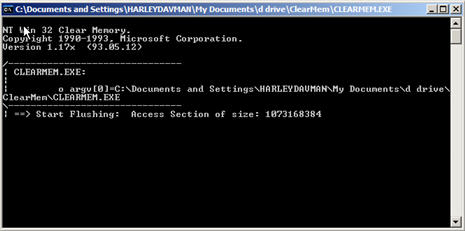
(Continued)...is it Forces pages out of physical memory and reduces the size of running processes if working sets to a minimum. When you run this tool, the system pauses because of excessive high-priority activity associated with trimming the working sets. To run this tool, your paging file must be at least as large as physical memory. To Check your Paging File, go into your control panel, then click on System, then go to the Advanced Tab, and Under “Performance” click “Settings” then the Advanced Tab . On the Bottom you should see “Virtual Memory” and a value. This is the value that must be at least as large as how much memory is in your system. If the Virtual Memory Value is smaller than your system memory, click Change and change the Min Virtual Memory to a number that is greater than your total system memory, then click “Set” and Reboot. ---- February 5th, 2006 ------- I am adding this addendum to the original article in response to the question of, "how do you run Clearmem?" that was posted in the Comments for this article. Every time you want to run it, you simply double click on clearmem.exe, When you double click on it, a black DOS window will pop up, like this: It will pause for awhile (don't worry that is normal), then it will Flush the memory and automatically close the black box. It automatically creates the files Flush1, Flush2, & Flush3 in whatever folder you ran it from. The next time you want to run Clearmem, simply double click on the Clearmem.exe again. Similar articles

Set as favorite
Bookmark
Email This
Hits: 17825 Comments (5)
![]()
Larry Miller
said:
|
|
As described above, clearmem does increase free memory. It does this by depriving active applications of the memory they need to operate efficiently. There is no benefit in doing this. It is based on the completely false idea that XP is incapable of managing memory by itself. XP has a complex and highly efficient system for freeing memory when it is required. Clearmem will greatly interfere with it's operation. Yes, clearmem is from Microsoft. However, it was designed as a tool for software developers and system administrators for testing purposes. It was never intended as a performance enhancing tool. References: http://home.comcast.net/~SupportCD/XPMyths.html Larry Miller Microsoft MCSA CompTIA Network , A Amateur programmer |
|
|
report abuse
vote down
vote up
|
| Clearmem although for the developer does do a great job for its intentions, yes it temporarily deprives ALL programs memory for a brief time 1 minute or less depending on the speed of your RAM, but from a repair tech stand point I love it, the apps that have memory leaks or grabbing way too much in the way of RAM, or even those Hijackers that load themselves into the memory to keep repeatably trying to go wherever, run Clearmem and those issues are resolved....... will you have to do it it again later, yeah sure on those programs that have mem leaks you will but for those issues that try to hijack....... not so much don't always take a MSCA word for law, they have opinions like anyone one else, just like this repair tech...... for me Clearmem is a great resource when you need it | |
|
report abuse
vote down
vote up
|
| I have used clearmem for some time: essential when my RAM was only 512MB, still useful with RAM at 1GB, and very revealing of Windows greedy use of memory. Now that I have upgraded to 2GB of RAM, however, clearmem has stopped working. Paging memory is set at 4GB. Any suggestions to get clearmem working again? | |
|
report abuse
vote down
vote up
|
| How are you suposed to read the memory dumps from clearmem of flush 1 to 3? Notepad dosnt seem to work any other way of doing it? | |
|
report abuse
vote down
vote up
|