| Recreate the Show Desktop shortcut |
| Written by mypchell.com | ||||||||||||||||
|
Note: Click on any image for a larger view of that particular image.
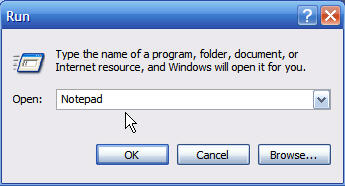
Click
then
Type notepad then click
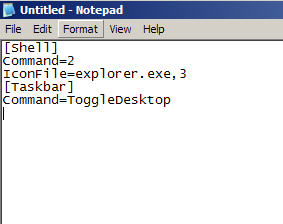
Copy/Paste the following into Notepad: [Shell]
Then Go to File, then Save As, then navigate to any location (just remember where you went) I chose Desktop. Make sure that Save As Type is set to All Files. Then Name the file “Show Desktop.scf" then click Save.
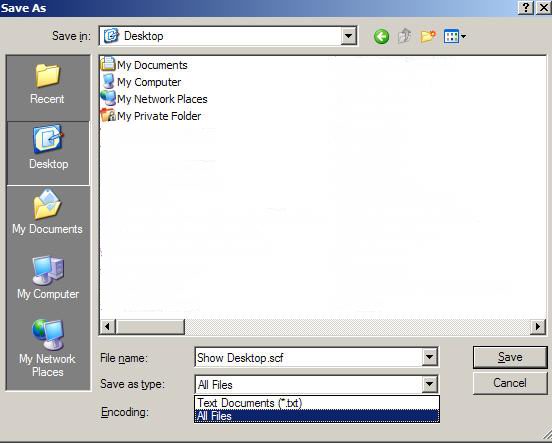
Now, navigate to your desktop to see your newly recreated Show Desktop shortcut
Similar articles
Set as favorite
Bookmark
Email This
Hits: 14955 Comments (5)
![]()
Ben Jeffers
said:
|
i was given this info by another website but it did not tell me to save it as all files. thanks it worked |
|
|
report abuse
vote down
vote up
|
| it works perfectly, just drag and drop the shortcut to the quicklaunch area.. perhaps change the size of the are to make it fit. Right click the quicklaunch bar and unlock the taskbar.. then resize area.. and then lock the taskbar again. | |
|
report abuse
vote down
vote up
|
| It worked -- I got a favorite shortcut back! Now if I could just figure out why it vanished in the first place... | |
|
report abuse
vote down
vote up
|
| Thanks. Can't remember either how I lost it but thanks for the help! | |
|
report abuse
vote down
vote up
|