Disclaimer: Warning Serious problems might occur if you modify the registry incorrectly by using Registry Editor or by using another method. Modify the registry at your own risk, Every effort has been made to ensure that registry edit instructions are correct and safe. MyPCHell cannot be held responsible for any damage done to your system by using this guide.
Before beginning this guide, please do this
Click  then
then  Type regedit then click OK

Then navigate to the following key:
HKEY_CURRENT_USER\Software\Microsoft\Windows\CurrentVersion\Policies\ActiveDesktop
This key may not exist in your registry, if it does not, then create it. To create this key right click on Policies and select New then Key then name the key strong
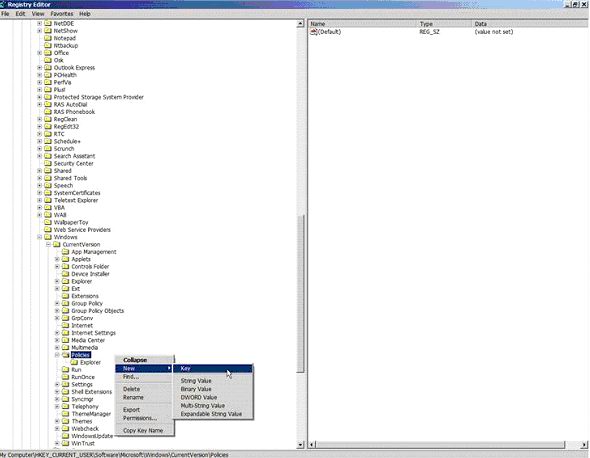
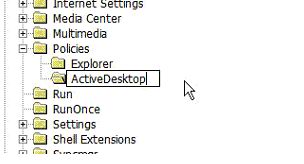
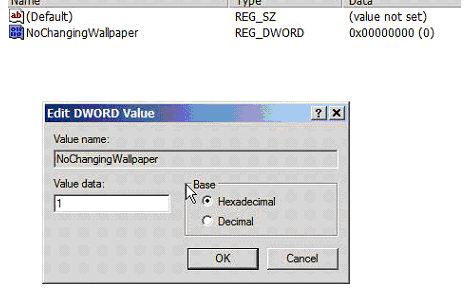
Then once you have created the ActiveDesktop key, click on it and on the right hand window, right click and select New then Dword. Name the Dword NoWallpaperChanging
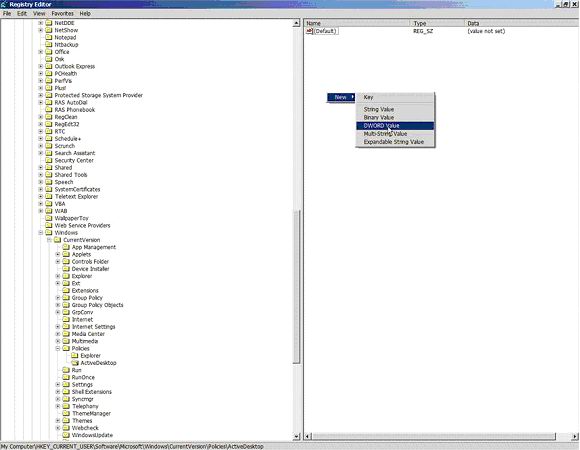
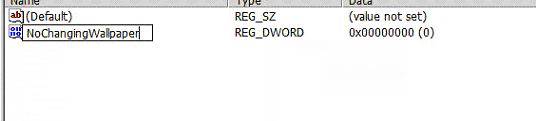
Double Click on this New DWord you just created and give it a value of 1
Reboot your computer
To make this setting machine wide navigate to navigate to the following key:
HKEY_LOCAL_MACHINE\Software\Microsoft\Windows\CurrentVersion\Policies\Active Desktop
And create a DWord, name it NoChangingWallpaper, then double click on the new Dword you just created and give it a value of 1)