The worst offenders for large attachments are pictures and PowerPoint shows.
There’s some simple things that you can do to avoid larger-than-needed file attachments.
-
Pictures should be resized (unless quality is paramount). Whether they are sent as standalone attachments or inserted into documents. Pictures taken straight from a digital camera will often be way too big to use without resizing. Changing the size is easy though.
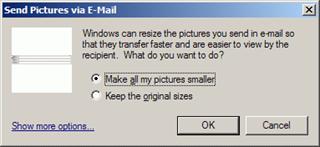
Windows XP offers an option to change a picture size for emailing.
Right click on the image file and choose Send To, then Mail Recipient
Windows will bring up a dialogue box to resize the picture.
The other method, which I like, is to use a free program that is just for resizing. Photo Gadget is free and very effective. Once installed, it creates an additional option on the right-click context menu of images.
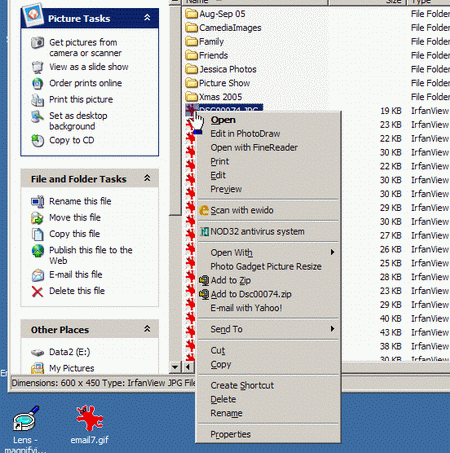
Right-click the image file.
Choose Photo Gadget Picture Resize from the menu.
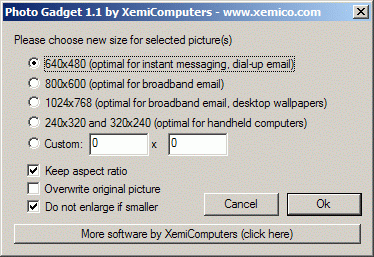
For most emails, the default size of 640x480 is absolutely fine.
Photo Gadget saves a copy of the picture at the smaller size and names it the same as the original with the size added. This is useful if you might want to send the picture more than once.
For inserting pictures in documents, consider using the smallest size of 240x320
You will be amazed at the difference in file sizes when they are resized this way.
Download Photo Gadget from here: http://www.xemico.com/photogadget/
PowerPoint Shows are another problem, big file sizes that are often just a recycled joke madder into a presentation. Not much you can do about the sizes, apart from if it’s you that creates the presentations out of jokes. If it is, stop it!
Finally, all those short video clips that get sent around. They are often big files, and most of them aren’t that interesting. Only send them if you really think the person on the receiving end is going to appreciate it. If it’s to me – ask me first!
Think before you send that huge file. Think about the person receiving it.


